Reward automation with Zapier works best when a verified business action triggers a reward through Promotion Vault. The right setup reduces manual sending, protects budget, improves follow-through, and turns every reward into measurable engagement.
TLDR — How To Automate Rewards With Zapier And Promotion Vault
- Automate rewards only after verified business actions.
- Start with one behavior: referral, renewal, upgrade, or show-up.
- Use Zapier to move the signal, not define the strategy.
- Add eligibility filters before any reward is sent.
- Send rewards through a branded, trusted recipient journey.
- Track activation, completion, and cost — not just sends.
- Use pay-on-activation economics to reduce reward waste.
- Build one clean workflow before scaling more automations.
- Measure lift weekly, then adjust reward value or timing.
- Book a Promotion Vault demo to map your first reward workflow.
- What Does Reward Automation With Zapier Actually Solve?
- How Does Zapier Connect Business Actions To Promotion Vault Rewards?
- Which Reward Triggers Are Worth Automating First?
- How Should We Design A Reward Automation That Protects Budget?
- How Do We Keep Automated Rewards From Feeling Generic Or Suspicious?
- How Do We Build A Reward Workflow In Zapier Step By Step?
- What Reward Automation Use Cases Work Best Across Teams?
- How Should We Use Rewards For Surveys And Feedback?
- How Do We Measure Whether Automated Rewards Are Working?
- What Objections Should We Answer Before Launching?
- How Do We Launch A First Reward Automation Pilot?
- Frequently Asked Questions About Reward Automation With Zapier
- So, How Should We Really Automate Rewards With Zapier?
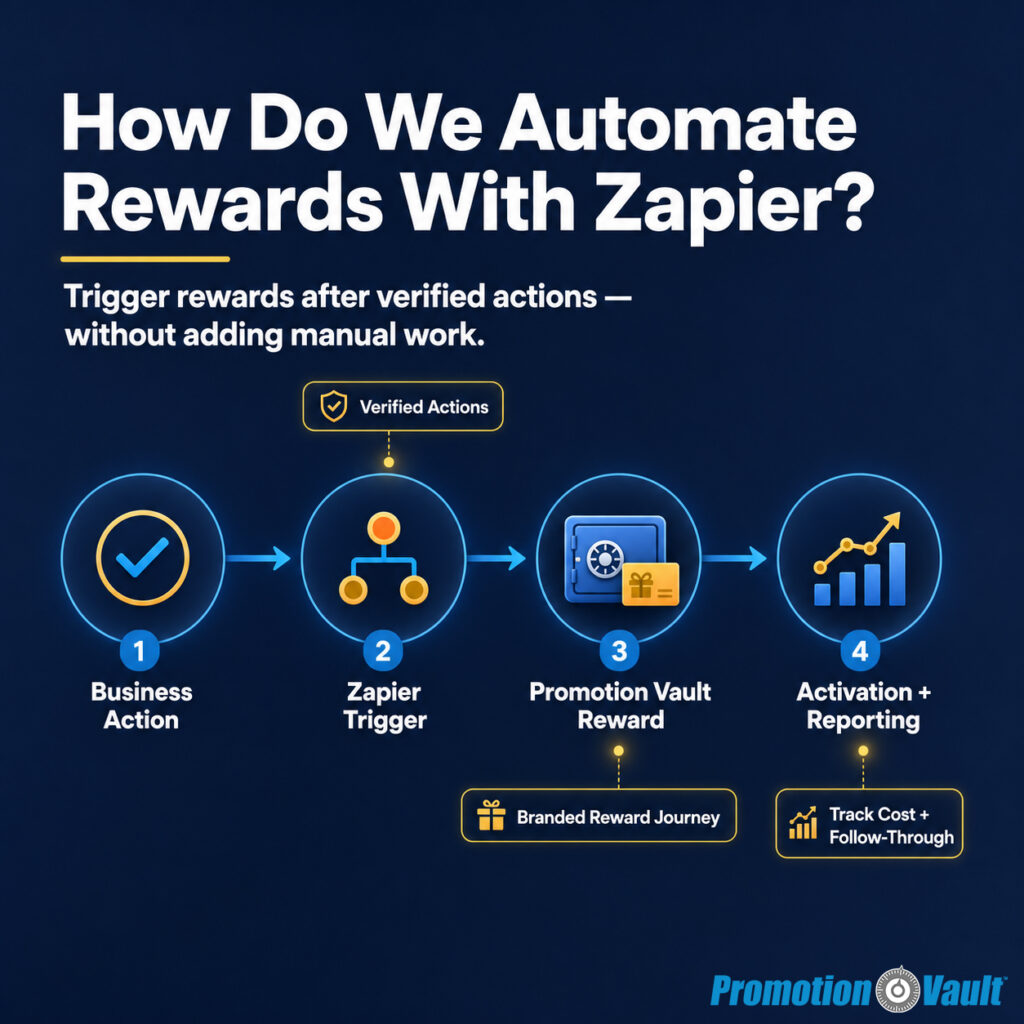
A reward program usually breaks in the handoff.
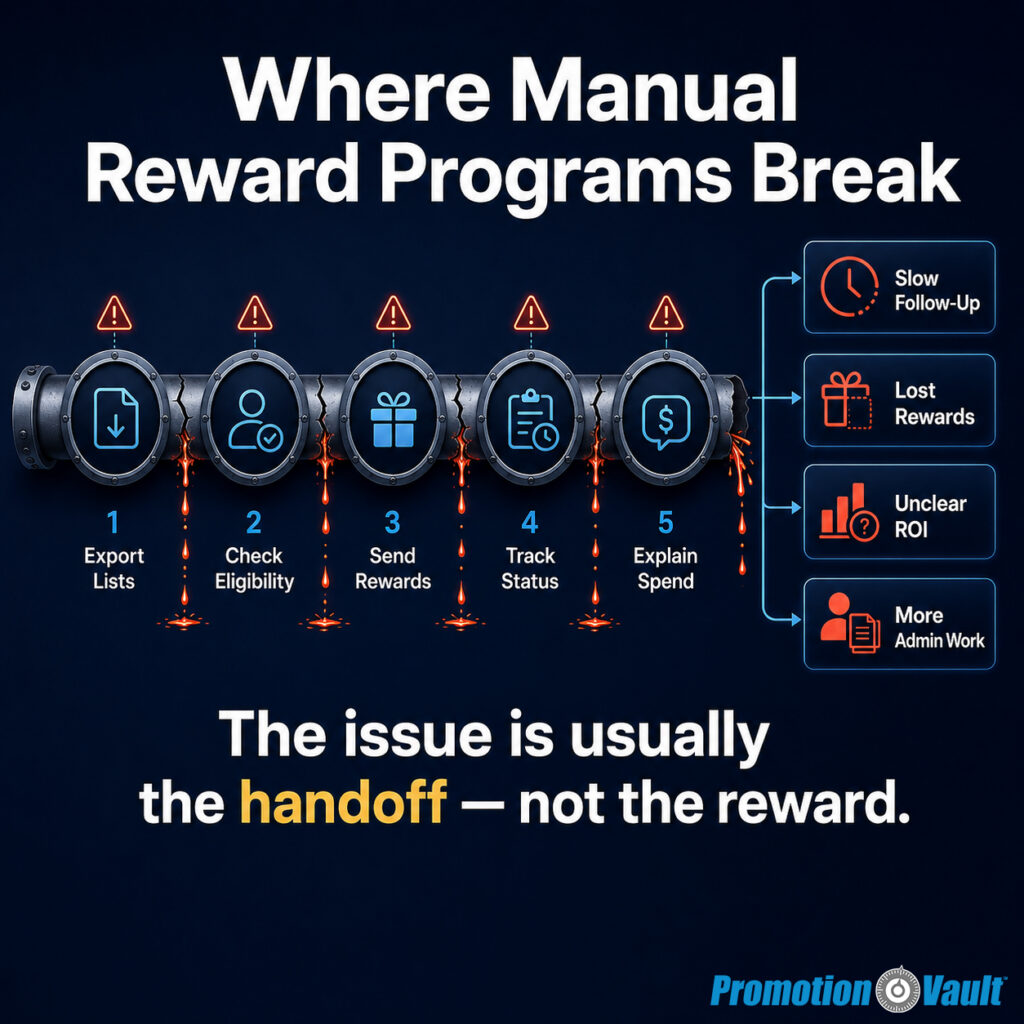
A customer books the demo. A member refers a friend. An employee hits a milestone. A survey response comes in. Everyone agrees that moment matters — but then someone has to export a list, check the rules, send the reward, update the spreadsheet, answer the “Where is my reward?” email, and explain the spend later.
That is where reward automation earns its place.
Not by making rewards feel mechanical. Not by sending money for every small click. And not by turning a thoughtful program into a pile of disconnected workflows. The real promise is cleaner: use Zapier to connect the tools your team already trusts to a reward system that sends only when the right action happens.
For operators, growth teams, RevOps, HR, and finance, that matters. Manual reward programs are hard to repeat. Broad discounts can train people to wait for a deal. Payout-only tools can deliver value, but often stop before the relationship, reporting, and follow-up begin.
Promotion Vault and Zapier solve a different problem together. Zapier moves the signal from one system to another. Promotion Vault turns that signal into a branded reward experience that can be activated, tracked, followed up on, and measured.
A reward automation is only as strong as the action it rewards.
What Does Reward Automation With Zapier Actually Solve?
Reward automation with Zapier solves the manual handoff between a completed action and a delivered reward. It lets teams trigger rewards from CRMs, forms, payment tools, survey platforms, spreadsheets, and other systems, while Promotion Vault manages the branded reward experience, activation flow, reminders, reporting, and spend control.
This is the shift that matters most: reward automation should not start with the reward. It should start with the behavior.
A gym may want to reward a guest who actually shows up for a tour, not every person who fills out a form. A SaaS team may want to reward a trial user after setup, not after signup alone. A dealership may want to reward a customer after the first service visit, not after a loose expression of interest. An HR team may want to recognize first day, 30 days, birthday, and work anniversary without asking managers to remember every date.
Zapier helps because it can connect the event source to the reward workflow. Zapier’s public site says it supports no-code automation across 9,000+ apps, which is why teams often use it as the bridge between tools they already run. A trigger happens in one system. A filter checks whether the event qualifies. An action sends the right record to Promotion Vault.
That makes the reward program more repeatable. It also makes it more defensible. The operator can say, “We rewarded completed actions, not vague intent.”
For Promotion Vault customers, that distinction is central. The platform is built for behavior-based rewards across acquisition, retention, referrals, upgrades, reactivation, employee recognition, and research incentives. When Zapier supplies the trigger, Promotion Vault can help complete the reward lifecycle.
How Does Zapier Connect Business Actions To Promotion Vault Rewards?
Zapier connects business actions to Promotion Vault rewards through trigger-and-action workflows. A trigger captures an event, such as a paid invoice or form submission. Filters confirm the event qualifies. The final action adds the person to a Promotion Vault promotion or sends a reward through an approved workflow.
Think of Zapier as the messenger, not the strategy.
It should not decide which actions matter. Your business should decide that first. Then Zapier carries the qualified event to the reward system.
A simple workflow might look like this:
| Workflow Piece | What It Means | Example |
|---|---|---|
| Trigger | The event that starts the workflow | A new paid invoice in Stripe |
| Filter | The rule that checks eligibility | Invoice amount is $100 or more |
| Action | The reward step | Add customer to a Promotion Vault promotion |
That structure matters because incentives attract attention. If the rule is too loose, you may reward low-quality behavior. If the rule is too hard to understand, people may ignore it. If the workflow is manual, the program may only run well on days when someone has time.
Zapier gives the workflow a path. Promotion Vault gives the reward a system.
For teams using GoHighLevel, Promotion Vault’s webhook process follows the same logic. The team gets the API token, Team ID, and Promotion ID inside Promotion Vault, creates a workflow in HighLevel, adds a custom webhook action, sends the contact record to Promotion Vault, and tests that the lead was added to the promotion. That same pattern applies broadly: qualify the event, pass the record, verify the reward, and monitor results.
That is practical automation. It does not ask your team to rebuild the business. It fits rewards into the systems already carrying your customer, employee, or lead data.
For teams that need a faster path, Promotion Vault also has a dedicated Zapier integration page and a deeper guide to no-code automated rewards for acquisition, referrals, and retention. For custom stacks, the Vault API gives teams a direct path to connect their data to reward delivery.
Which Reward Triggers Are Worth Automating First?
The best reward triggers are completed actions that already matter to revenue, retention, employee experience, or data quality. Start with moments your team can verify, explain, and measure: paid conversion, booked-and-showed appointment, validated referral, renewal, upgrade, first 30-day milestone, completed survey, or employee anniversary.
This is where many reward programs drift.
They begin with a useful idea — “let’s reward engagement” — but engagement is too broad to automate well. We need the sharper question: What action, if repeated more often, would make the business healthier?
Start there.
For acquisition, the action might be a booked demo that becomes a completed demo. For fitness, it may be a guest pass, first visit, ACH switch, referral conversion, or upgrade. For SaaS, it may be setup completed, integration connected, first project created, teammate invited, or trial converted. For automotive, it may be appointment show-up, first service completion, declined-service return, or referral conversion. For HR, it may be first day, 30 days, birthday, work anniversary, training completion, or a role-specific milestone.
The point is not to reward everything. The point is to reward the moments that create momentum.
Here is a practical starting framework:
| Business Goal | Better Trigger | Weak Trigger To Avoid |
|---|---|---|
| More qualified leads | Form completed and validated | Any page visit |
| More sales conversions | Paid conversion or showed appointment | Email opened |
| Better onboarding | Setup completed or first key action | Account created only |
| Stronger referrals | Referral validated or converted | Referral form started |
| Better retention | Renewal completed or usage milestone hit | Generic loyalty status |
| Better employee experience | First day, 30 days, birthday, anniversary | Manager memory |
This helps finance trust the program. It helps ops build the workflow. It helps marketing explain the offer. It helps recipients understand what they did to earn the reward.
It also protects brand value. We do not need to discount the core product or service. We can recognize meaningful follow-through instead.
How Should We Design A Reward Automation That Protects Budget?
Design reward automation around verified actions, clear eligibility rules, activation tracking, and spend caps. Promotion Vault’s pay-on-activation model helps teams avoid paying full reward value for recipients who never activate, while Zapier filters help prevent rewards from firing before the qualifying action is complete.
Budget protection is not about being stingy. It is about being able to scale with confidence.
A weak reward workflow says, “Send this to everyone.” A stronger one says, “Send this only after the action we can defend.”
That difference changes the economics.
Promotion Vault uses pay-on-activation economics. In practical terms, a service fee is charged when the reward is sent, and reward value is charged when the recipient activates. That means unactivated rewards do not create the same full-value waste found in pay-on-send models. It also gives finance a cleaner way to forecast: eligible, activated, completed, cost per activated reward, and downstream lift.
Zapier adds another layer of control before the record enters Promotion Vault. Use filters, required fields, and paths to keep rewards from firing too early.
A good budget-safe automation includes these rules:
- Define One Qualifying Action. Write the trigger in plain English: “Reward a member when their referral becomes a paid member,” or “Reward a trial user when setup is complete.”
- Use A Filter Before Sending. Confirm the record qualifies before it reaches Promotion Vault. Check plan type, order value, appointment status, referral status, employee status, or completion date.
- Set A Reward Value You Can Defend. Tie the reward to the value of the action. A high-intent conversion can justify more than a low-commitment form fill.
- Use Activation Windows. Give recipients a clear timeframe to activate. Shorter windows work for urgent offers. Longer windows work for relationship-building programs.
- Review Activated Cost, Not Just Sent Volume. Sent volume shows reach. Activation shows engagement. Completed rewards and downstream behavior show whether the program earned its keep.
This is where Promotion Vault differs from one-off reward sending. The reward is not the final step. It becomes a measurable part of the journey.
How Do We Keep Automated Rewards From Feeling Generic Or Suspicious?
Automated rewards feel trustworthy when they are branded, expected, clear, and tied to a real action the recipient remembers. Promotion Vault supports a branded reward journey with sender identity, activation, passwordless access, reminders, and redemption choice, which helps rewards feel legitimate instead of random or spam-like.
Trust is no longer a soft issue.
Recipients have been trained to question unexpected reward messages. That skepticism is reasonable. The Federal Trade Commission continues to warn consumers about gift-card-style scams, and the National Conference of State Legislatures summarized FTC data showing more than 41,000 fraud reports in 2024 tied to gift cards and prepaid cards.
That does not mean businesses should stop using rewards. It means the reward experience has to feel legitimate.
A generic message from an unknown sender creates friction. A branded reward tied to a recent action creates recognition. The recipient can connect the dots: “I completed the survey,” “I attended the appointment,” “I referred my friend,” “I hit my work anniversary.”
That memory reduces doubt.
Use this trust checklist before launching:
- The sender name matches the brand or team the recipient knows.
- The reward message names the action or reason.
- The reward amount is clear.
- The call to action is simple.
- The recipient can access the reward without creating a password.
- The experience uses consistent brand colors and language.
- Follow-up reminders stop once the reward is activated.
- Support knows how to answer reward-status questions.
This is not decoration. It is conversion infrastructure.
A trusted reward gets activated more often. A clear reward creates fewer support tickets. A branded reward strengthens the relationship instead of feeling like a loose payout.
That is why the experience matters as much as the automation.
How Do We Build A Reward Workflow In Zapier Step By Step?
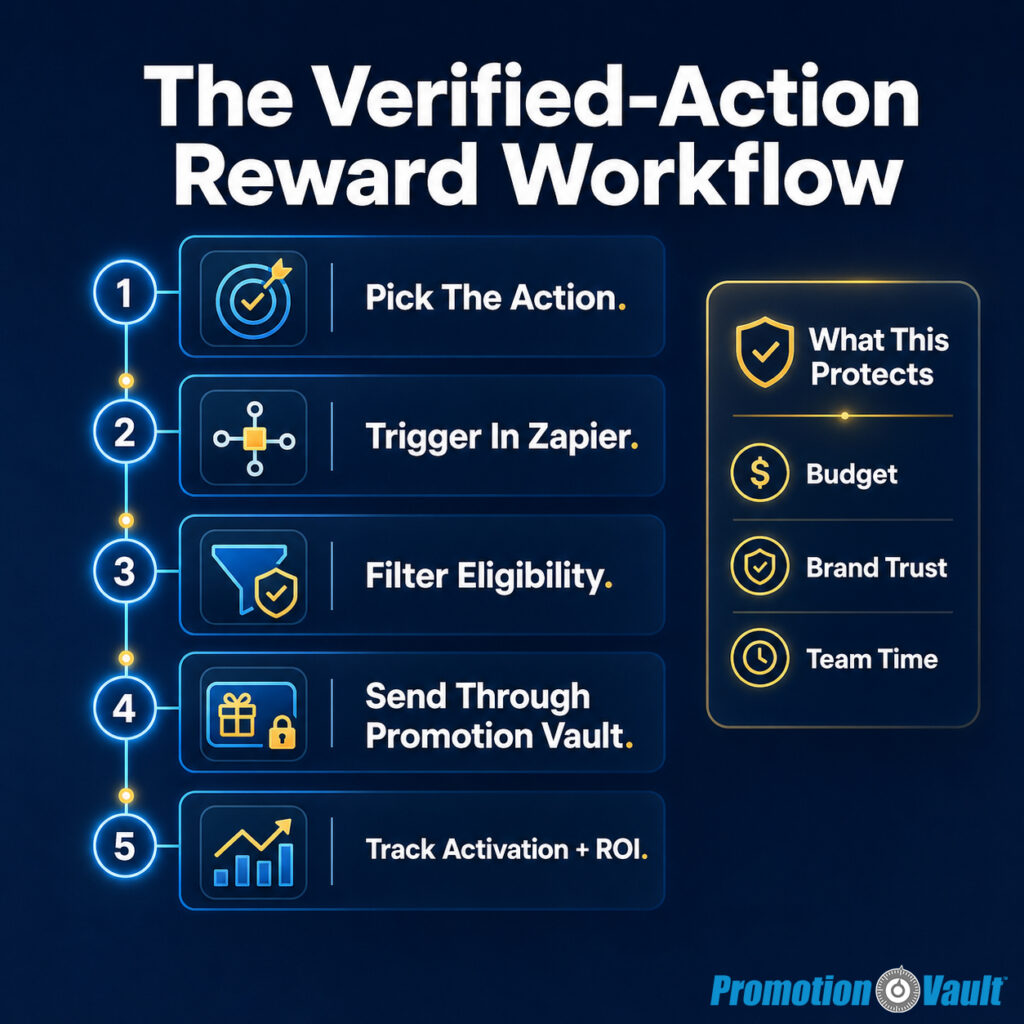
Build a reward workflow in Zapier by choosing the qualifying action, selecting the source app trigger, adding filters, mapping recipient data, sending the record to Promotion Vault, testing with a real contact, and reviewing activation results after launch. Keep the first workflow narrow so the team can learn quickly.
The first automation should be boring in the best way.
Pick one action. Pick one reward. Pick one audience. Test the full path. Then expand.
Here is the practical build:
Step 1: Choose The Business Action We Want More Of
A good automation starts with a sentence your team can repeat: “When a qualified referral becomes a customer, send the referrer a reward.” That sentence becomes the operating rule. Avoid vague triggers like “customer engagement” or “lead activity.” Use a completed action.
Step 2: Select The Source System In Zapier
Choose the app where the action already appears. That might be Stripe, HubSpot, Salesforce, Shopify, Google Forms, Typeform, Google Sheets, GoHighLevel, Eventbrite, Zendesk, Intercom, or another tool your team uses. Zapier’s role is to watch for the event.
Step 3: Add Filters So Only Qualified Records Continue
Use filters to block bad sends. Require the right status, value, date, plan, location, lead source, employee status, or referral outcome. This is where the workflow protects spend.
Step 4: Map The Recipient Fields
At minimum, the reward workflow needs the recipient’s name and either email or mobile, depending on the send path. Add relevant tags when useful. Tags help segment campaigns, trigger questions, and report on performance later.
Step 5: Send The Record To Promotion Vault
Use the available Promotion Vault Zapier action or a webhook/API path when the workflow needs more control. Promotion Vault’s API page explains that custom integrations can deliver the right reward to the right person at the right time using your data.
Step 6: Test With A Controlled Contact
Do not test with a live customer list. Use a test contact, check the Zap run log, confirm the record appears inside Promotion Vault, and verify that the reward message and activation path work as expected.
Step 7: Monitor Activation And Completion
After launch, track eligible, activated, completed, expired, and cost per activated reward. If activation is low, review timing, subject line, sender trust, offer clarity, reward value, and whether recipients remember the action.
Step 8: Expand Only After The First Workflow Holds
Once the first workflow runs cleanly, copy the pattern to adjacent moments. A referral workflow can become a double-sided referral workflow. A new-customer workflow can become a 30-day retention workflow. An employee welcome workflow can become a first-month check-in.
This is how automation becomes leverage. We do not build a giant program at once. We build one reliable loop, then repeat what works.
What Reward Automation Use Cases Work Best Across Teams?
The strongest reward automation use cases are moments where action, timing, and proof are clear. Marketing can reward conversions and referrals. Customer success can reward onboarding and renewal milestones. HR can automate employee recognition. Research teams can reward completed feedback. Finance can monitor cost by activation instead of guessing from send volume.
Reward automation should fit the team that owns the outcome.
A growth marketer needs lift. A program operator needs reliability. HR needs consistency. Finance needs spend control. A business owner needs a program that runs without becoming another weekly chore.
Here are practical places to start:
| Team | Reward Automation Use Case | Strong Trigger |
|---|---|---|
| Growth / Marketing | Acquisition reward | Trial converted, appointment showed, checkout completed |
| RevOps / CRM | Sales workflow reward | Lifecycle stage changed to customer |
| Customer Success | Onboarding reward | Key setup action completed |
| Referral Program Owner | Referral reward | Lead validated or converted |
| HR / People Ops | Employee milestone reward | First day, birthday, anniversary, 30-day milestone |
| Research / CX | Survey incentive | Survey submitted with required fields |
| Finance / Ops | Budget-controlled incentive program | Reward activated and completed |
This is also where Promotion Vault’s broader platform matters.
For referral programs, Promotion Vault’s referral software article explains why referrals work better as a loop: capture the lead, validate the lead, reward the right person, and keep the program moving. For HR, the article on automated employee milestone rewards shows how first days, birthdays, anniversaries, and feedback moments can become a repeatable lifecycle rather than a manager-memory problem. For broader program strategy, the article on the best rewards fulfillment platform for driving growth explains why reward delivery alone is not enough when the goal is measurable behavior.
The use case can change. The principle stays the same.
Reward the action that matters. Automate the handoff. Measure the result.
How Should We Use Rewards For Surveys And Feedback?
Use rewards for surveys and feedback when the response has real business value and the ask is respectful. Keep the survey short, reward completion promptly, and tie the question to the moment. Promotion Vault can pair reward moments with feedback so teams learn while customers or employees are already engaged.
This works because timing changes the feel of the ask.
A survey sent cold often feels like homework. A question asked inside a reward moment can feel like part of the exchange: “You took an action. We appreciate it. Help us improve.”
External research supports the general idea that incentives can improve response behavior. A PLOS One systematic review and meta-analysis found statistically significant increases in consent and response rates when participants were offered even small monetary incentives. That does not mean every survey should be paid. It means incentives can reduce friction when the response matters.
The operating rule is simple: do not reward people for giving the answer you want. Reward them for giving a thoughtful response.
Good reward-linked feedback asks one useful question:
- “What almost stopped you from joining?”
- “What made you decide to upgrade?”
- “What would have made your first visit easier?”
- “Do you feel ready for your role?”
- “Is there anything that might cause you to leave in the next 30 days?”
- “What should we fix before your next visit?”
Promotion Vault’s Data Vault approach is built around this idea: use the reward moment as a learning loop. That gives operators something more useful than a redemption report. It gives them a reason, a pattern, and a next test.
How Do We Measure Whether Automated Rewards Are Working?
Measure reward automation by tracking eligible recipients, activations, completed rewards, reward cost, downstream action, and feedback. Sent rewards show reach, but activation and completed behavior show whether the program created engagement. The best reporting compares reward performance by trigger, audience, value, and campaign.
A reward program should answer four questions:
- Who qualified?
- Who activated?
- What did it cost?
- What happened next?
If we cannot answer those questions, we do not yet have a performance program. We have activity.
Promotion Vault’s activation model gives teams a more useful view. Activation rate shows how many eligible recipients took the step to claim the reward. Completion shows whether the reward reached the usable stage. Tags, campaigns, and promotion data can help segment performance by audience, location, behavior, or offer.
This is important because averages hide the truth.
A $10 reward may perform well for survey completion but poorly for a high-value referral. A 7-day activation window may work for event attendance but feel too tight for a longer employee recognition program. A CRM-triggered reward may outperform a manual batch send because the timing is closer to the action.
Use a simple scorecard:
| Metric | What It Tells Us |
|---|---|
| Eligible | How many people qualified |
| Activated | How many claimed the reward |
| Completed | How many reached reward availability |
| Activation Rate | Whether the message, timing, and value worked |
| Cost Per Activated Reward | What engagement actually cost |
| Downstream Lift | Whether the business action improved |
| Feedback Themes | Why people acted or did not act |
The goal is not to prove that every reward is perfect. The goal is to learn quickly enough to improve the next send.
What Objections Should We Answer Before Launching?
Before launching reward automation, answer the strongest objections directly: whether rewards attract low-quality behavior, whether the program will be hard to run, whether finance can defend the cost, whether recipients will trust the message, and whether the team can prove the reward caused meaningful lift.
These objections are reasonable. We should not wave them away. Incentive programs can be poorly designed. They can reward the wrong action. They can create support work. They can feel suspicious. They can become expensive if the team cannot explain what happened.
The fix is better system design.
“Will Rewards Attract The Wrong People?”
They can if the reward is tied to shallow intent. Gate rewards behind verified actions. Reward showed appointments, validated referrals, completed onboarding, paid conversions, renewals, or employee milestones. Do not reward every casual click.
“Will This Create More Work?”
It should reduce work when the workflow is narrow and tested. Start with one trigger, one audience, one promotion, and one report. Zapier handles the handoff. Promotion Vault handles the reward lifecycle.
“Can Finance Defend The Cost?”
Finance can defend rewards when spend is tied to activation, campaign, and outcome. Use pay-on-activation economics, track activated cost, and compare results against a control or prior period when possible.
“Will Recipients Trust The Reward?”
They are more likely to trust it when the message is branded, clear, and connected to a remembered action. Use consistent sender identity, plain language, and a secure reward experience.
“Can We Prove It Worked?”
Use a pilot. Compare rewarded and unrewarded cohorts when possible. At minimum, track baseline performance before launch, then monitor lift, activation, cost, and feedback after launch.
The mature version of reward automation does not pretend incentives are magic. It treats them as a lever. A lever still needs a clear target, clean mechanics, and careful measurement.
How Do We Launch A First Reward Automation Pilot?
Launch a first reward automation pilot by choosing one high-value action, one audience, one reward amount, one automation path, and one measurement window. Build the workflow in Zapier, send through Promotion Vault, test with a controlled record, then review activation, cost, and downstream lift weekly.
The first pilot should be small enough to manage and important enough to matter.
Here is a simple 30-day pilot structure:
Week 1: Map The Action
Choose one action the team already tracks. Write the qualification rule in plain English. Example: “Reward a customer when their referral becomes a paid customer.”
Week 2: Build And Test The Workflow
Create the Zapier trigger, add filters, map fields, and send the record to Promotion Vault. Test with one controlled contact. Confirm the reward message, activation flow, and reporting.
Week 3: Launch With A Budget Cap
Turn on the workflow for a defined audience. Cap exposure so finance knows the maximum risk. Watch for duplicate sends, missing fields, and activation issues.
Week 4: Review And Adjust
Look at eligible, activated, completed, cost, and downstream action. Review feedback if questions were attached. Decide whether to raise reward value, adjust timing, narrow eligibility, or expand the workflow.
This is enough to learn. It is also enough to build internal confidence.
A good pilot gives the operator a clear answer: keep, adjust, or stop.
Frequently Asked Questions About Reward Automation With Zapier
What Is Reward Automation With Zapier?
Reward automation with Zapier is the process of using a Zapier workflow to trigger rewards after qualified actions happen in other tools. A form, CRM, payment tool, spreadsheet, or app captures the event. Zapier passes the qualifying record to Promotion Vault, where the reward experience and reporting are managed.
Can We Automate Rewards Without Developers?
Yes. Many teams can automate rewards without developers by using Zapier triggers, filters, and actions. For more controlled or custom workflows, teams can use webhooks or Promotion Vault’s API. The right path depends on the complexity of the trigger, data rules, and reporting needs.
What Apps Can Trigger Automated Rewards?
Automated rewards can be triggered from many app categories, including CRMs, forms, payment processors, survey tools, spreadsheets, event platforms, support platforms, and marketing automation systems. Common examples include Stripe, Shopify, HubSpot, Salesforce, Google Forms, Typeform, Google Sheets, GoHighLevel, Zendesk, and Intercom.
What Is The Best First Reward Automation To Launch?
The best first reward automation is one tied to a verified action with clear business value. Good starting points include paid conversion, appointment show-up, validated referral, completed survey, renewal, upgrade, onboarding completion, or employee milestone. Avoid broad triggers that reward weak intent.
How Do We Prevent Duplicate Or Unqualified Rewards?
Prevent duplicate or unqualified rewards by using Zapier filters, required fields, unique IDs, status checks, date rules, and clear eligibility criteria. In Promotion Vault, use promotions, tags, activation windows, and reporting to monitor whether the right people are receiving the right rewards.
Is Zapier Better Than A Direct API Integration?
Zapier is often better for fast no-code launches and common workflows. A direct API integration is better when teams need custom logic, deeper system control, higher technical precision, or complex data rules. Many teams start with Zapier, prove the use case, then move high-volume workflows to API if needed.
So, How Should We Really Automate Rewards With Zapier?
Automate rewards with Zapier by tying one verified business action to one clear reward workflow, then sending that record through Promotion Vault for branded delivery, activation tracking, reminders, and reporting. This keeps the program simple, measurable, and easier to defend. Start with one high-value trigger, test the full path, review activated cost and downstream lift, then expand only after the workflow proves itself.
That is the bigger opportunity here. Reward automation is not just about faster sending. It is about giving your team a cleaner way to motivate action, protect budget, and learn from the moments people already care about.
- If the next growth target is acquisition, start with one verified conversion action: showed appointment, paid conversion, or validated referral.
- If the next priority is retention, start with one milestone: renewal, first 30-day behavior, upgrade, or reactivation.
- If the next priority is employee experience, start with one moment HR already wants to recognize: first day, 30 days, birthday, or work anniversary.
Then build one Zapier workflow, connect it to Promotion Vault, and measure activation before adding the next reward path.
To map the cleanest first workflow, book a Promotion Vault demo and bring one action your team wants more of. In 30 minutes, we can help turn that action into a reward pilot your operators, marketers, and finance team can understand.